The Inbox
See what changed on your databases, with the most urgent items first. Each item explains what happened and where to look next.
Inbox in the sidebar lists what RDST noticed on all your monitored databases. The badge next to it counts unread items. All databases at the top shows everything; pick a database there to see only its items. Opening an item for another database switches the app to that database.
The Inbox holds things that happened and need you. The standing list of changes worth making, like an index to add, lives in Actions. When new changes are ready for a database, the Inbox gets one item that points to them.
What raises an item
RDST raises an item when something changes in a way that matters for the database. A consistently heavy query is covered in the nightly report. The Inbox focuses on changes and incidents.
| Item | When |
|---|---|
| Query latency increased | A query that carries real load got slower than its own usual level |
| Query plan may have changed | A query's latency jumped in a way that points to a new plan |
| Query traffic increased | A query that carries real load is being called much more often |
| New heavy query | A query first seen in the last day is already carrying real load |
| Query stopped running | A busy query stopped. RDST skips queries that normally run in bursts |
| Stuck query | A query has been running for over a minute |
| Several queries at once | Several queries changed in the same burst, so they share one item named after the biggest. Smaller ones are listed as "N smaller queries also moved at the same time" |
| Rollbacks or deadlocks increased, Cache hit ratio dropped, connections near the maximum | A change across the whole database |
| Can't reach the database | RDST lost its connection. See Notifications |
| Sign in to resume alerts, Database password not set, and similar | Monitoring needs something from you before it can carry on |
| Daily report ready | The nightly report has been written |
RDST considers queries near the top by database time, new heavy queries, and changes that add substantial database work. Call count alone doesn't qualify a cheap query for an alert. Smaller changes can appear in a report or as context inside another item.
Act now, Watch and back to normal
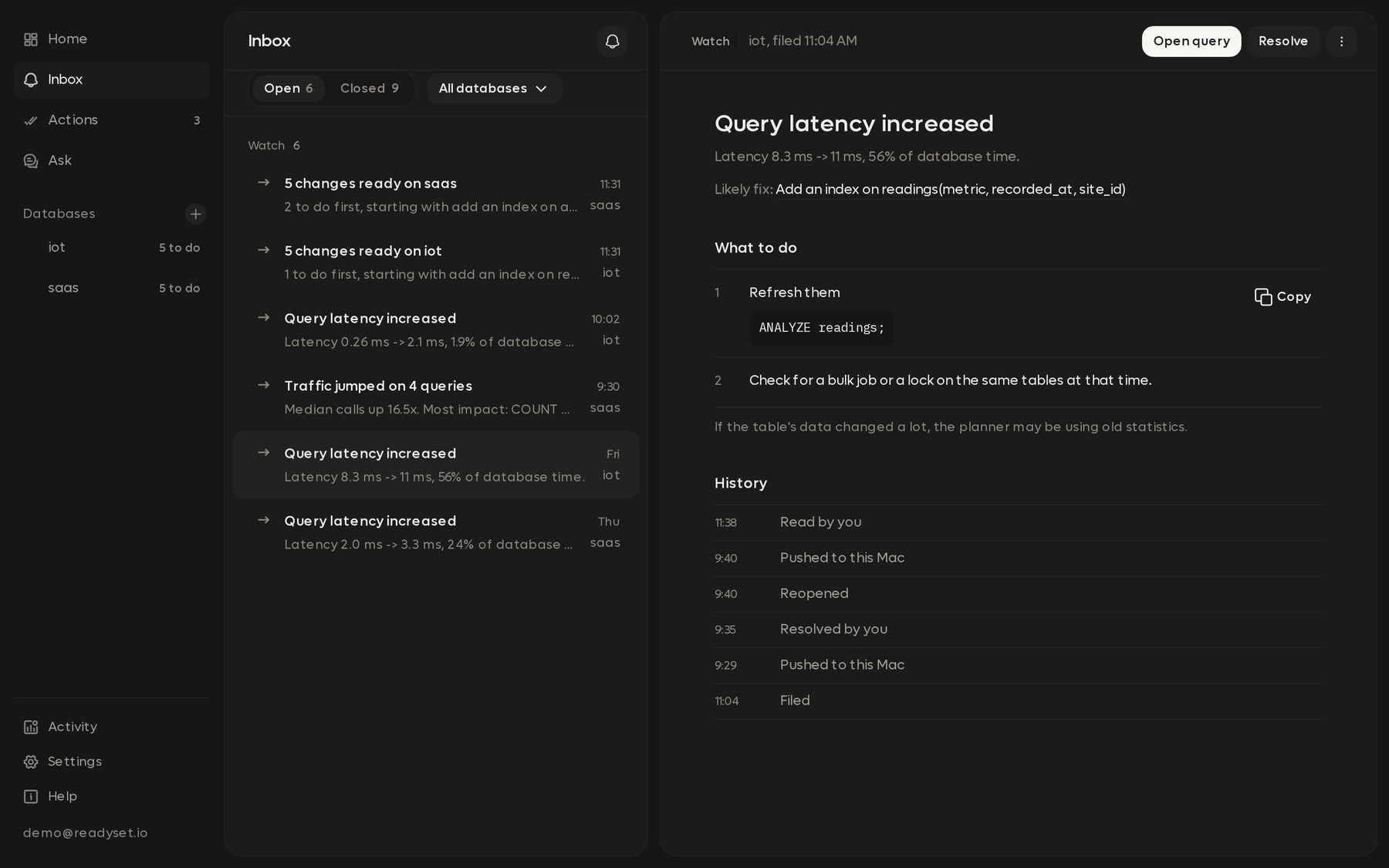
Items sit in sections by how urgent they are. Each item has a one-line reason that says why, like "Act now: latency up 3.2x on a top-10 query today, still happening".
| Section | What goes there |
|---|---|
| Act now (red) | Hurting the database right now, like a lost connection or a big slowdown on a key query that's still happening |
| Watch (amber) | Worth a look today. Smaller changes and reports list last |
| Recovered (green) | Back to normal, or closed, in the last 24 hours |
RDST closes an item on its own once the measurements are back to normal for 3 checks in a row. The item turns green and names what recovered and when, like "Latency back to normal at 11:25 PM". Something that's back to normal never stays in Act now.
The tabs at the top filter to Open, Act now or Watch.
Repeats
When the same burst happens again, RDST adds it to the existing item instead of opening a new one. Expand the item to see each occurrence, newest first, with its time and size.
A burst that repeats on a schedule, every hour or at the same time each day, becomes normal. It's marked Usual and ranks Watch at most. It alerts again only when an occurrence is bigger or lasts longer than usual, and the item says so: "This happens every day around 2:00 AM, and this time it's bigger than usual."
Opening an item
Items start collapsed to one line. Click one to expand it and see the queries involved, before and after numbers, and a small chart for each.
Each item links to the right place:
| Link | Opens |
|---|---|
| Open query | That query on the Database page, at the right section |
| Open affected queries | The Database page filtered to just the item's queries, set to the item's time frame |
| Open this time frame | The Database page zoomed to one occurrence, showing the tracked queries that ran then |
| Check connection | The connection details, for a lost connection or a missing password |
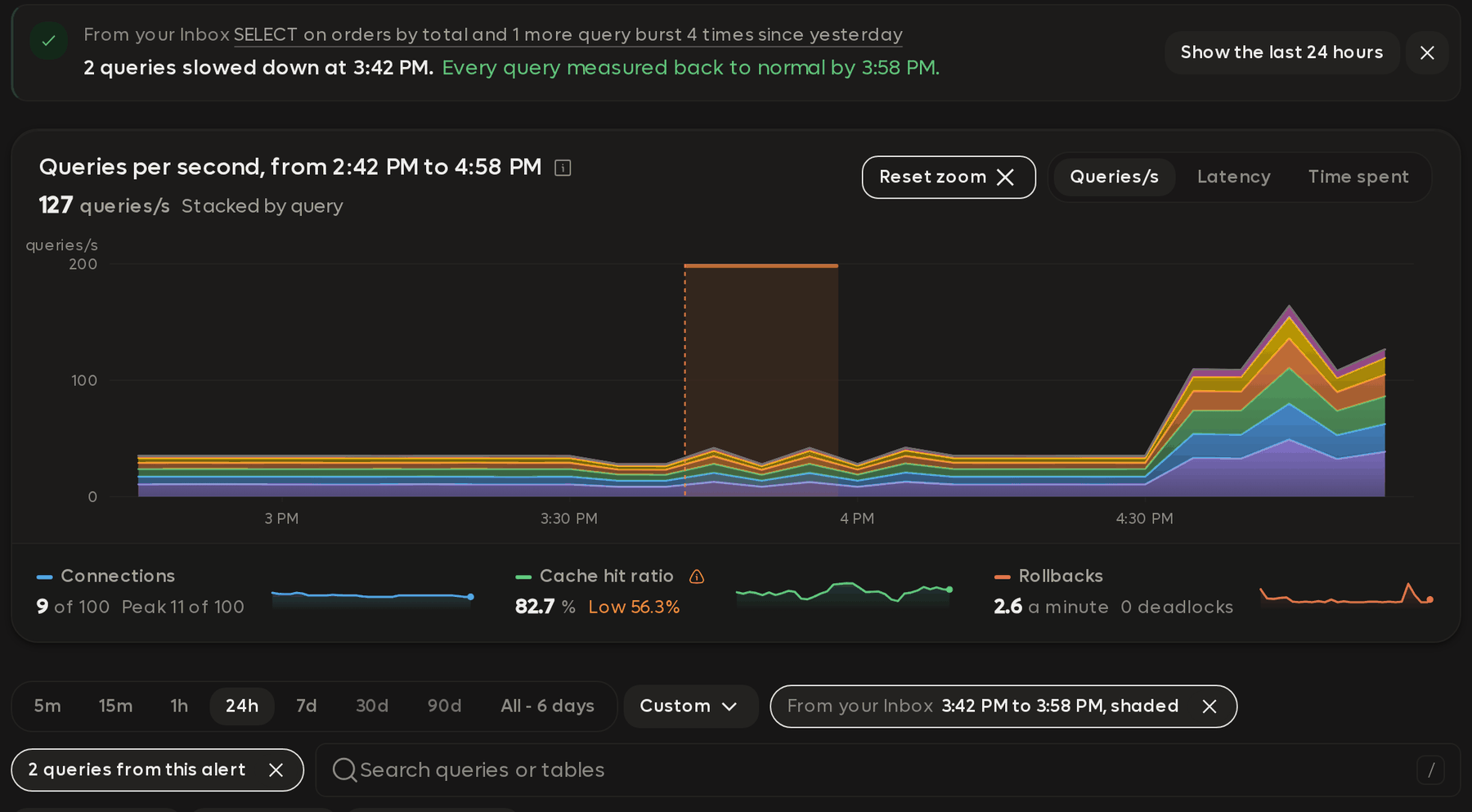
Some items also offer next steps as tiles, like See when it stopped, See what else ran then or Check its plan. When the fix is outside RDST, the item lists the steps, with SQL you can copy.
Dismiss, snooze and mute
From an item's menu:
- Dismiss closes it. It stays silent for the rest of that episode.
- Snooze hides it for 1 hour, 1 day or 1 week.
- Mute stops that kind of alert for the query, the database or all databases, for a day, a week, or until you unmute it.
Temporary mutes end at their set time. Alerts after that time follow your notification settings again.
Muted alerts are still recorded. Show muted lists them, and Notification settings holds the mute rules.
An item notifies once per episode. It notifies again only if the problem goes away and comes back, or gets at least twice as bad as when you were last told.