Actions
The short list of changes worth making on each monitored database, ranked by how much database time they'd save, with the SQL to run and a check that the fix worked.
Actions is where RDST tells you what to change. While monitoring runs, it keeps a ranked list of changes for each database, built from what it measures: which queries take the database's time, which indexes they read, how hard each table is written to, and how the server is set up. Each action says what to change, why it matters for this database, and the SQL or steps to do it.
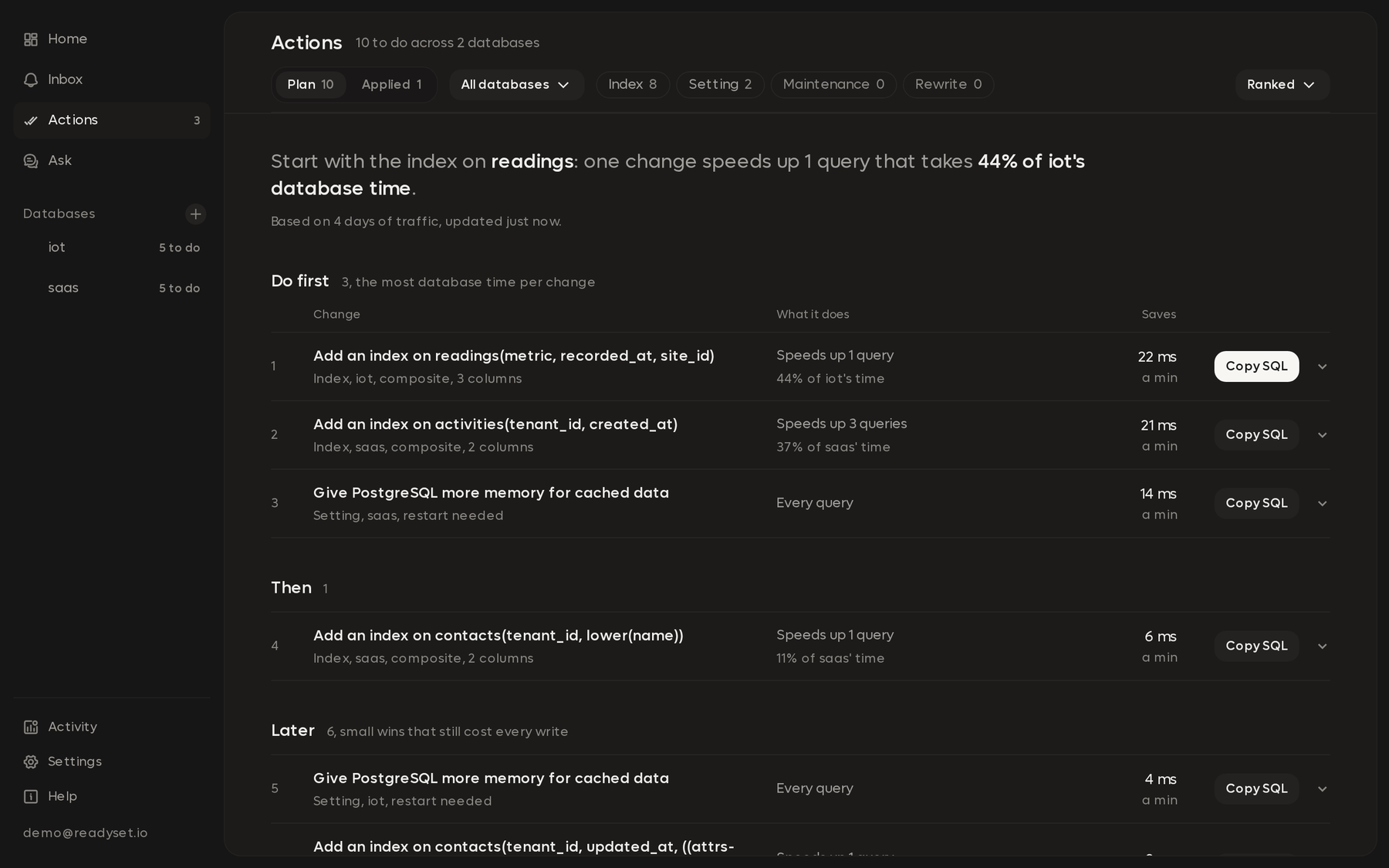
RDST never changes your database. It doesn't run the SQL in an action. You run it, through your own migration or change process, and RDST checks the database afterwards to see that it happened.
Kinds of change
| Kind | Where it comes from |
|---|---|
| Add an index | The index plan. RDST reads the deep analyses of your busiest queries, works out which indexes would speed them up, and weighs each one against the writes it would cost on its table |
| Drop an index | The index plan. An index no query reads, or one another index already covers, still costs every write. RDST suggests dropping it only when it's confident or the table is written to heavily |
| Rewrite a query | Deep analysis, which tests the rewrites it suggests. One shows up when it ran at least 20% faster, or the planner estimates 20% less work, on a read that takes at least 2% of database time |
| Server settings | Database checks, such as connections near the limit, sorts spilling to disk, or a buffer that's too small for the measured cache hit ratio |
| Maintenance | Database checks, such as tables that need a vacuum, stale statistics, or transactions left open |
The index plan also lists the indexes to keep, and smaller adds that would help
a little but still cost every write. Index changes on PostgreSQL use
CREATE INDEX CONCURRENTLY and DROP INDEX CONCURRENTLY, so writes keep
flowing while they run. Each index change comes with the SQL to undo it.
A drop on a database with replicas carries a note to check them first: a replica can read an index the primary doesn't.
When actions update
Actions follow the database as it changes. You don't need to start anything.
- First plan. When you turn monitoring on, RDST deep analyzes the 10 busiest reads first. The first plan is ready once they're done, usually within about 10 minutes. Until then, Actions shows how many of those analyses have finished.
- Index plan and rewrites. About every 5 minutes, RDST rereads table, index and setting statistics and rebuilds the plan from them and the latest deep analyses. A deep analysis that finishes can add or change an action on the next pass.
- Settings and maintenance. Database checks run when the database is added, again once there are a couple of minutes of traffic to measure rates, and then every 15 minutes. They don't use AI.
- Index changes. When RDST sees an index appear or disappear, the plan and the actions follow on the next pass.
Each kind of change says when it was last checked and when it's checked next.
How they're ranked
Every action gets a score for how much database time it should save. For an index or a rewrite, that's the share of database time its queries take times how much faster they'd get. Settings and maintenance findings are scored by how serious the check rates them.
While AI monitoring is on, a short AI read of each database's open actions adjusts the order by how urgent each one looks now, and can retire one it's sure no longer applies.
Actions are grouped into tiers by score:
| Tier | What goes there |
|---|---|
| Do first | The changes that save the most: up to three per database |
| Then | Changes that still save a meaningful part of what the best one saves |
| Later | Small wins |
Why each change matters
Each new change gets a one-sentence explanation tied to this database's evidence: the queries it touches, their share of database time, and the writes it costs or saves. The index plan gets two or three sentences on why its changes fit together.
RDST writes these with a short AI call, once per change. Changes found close together share a call, and each database gets at most 3 a day, at least 15 minutes apart. A change found after that day's calls are used shows without its explanation until the next day's first call. Nothing new means no call.
What you can do with one
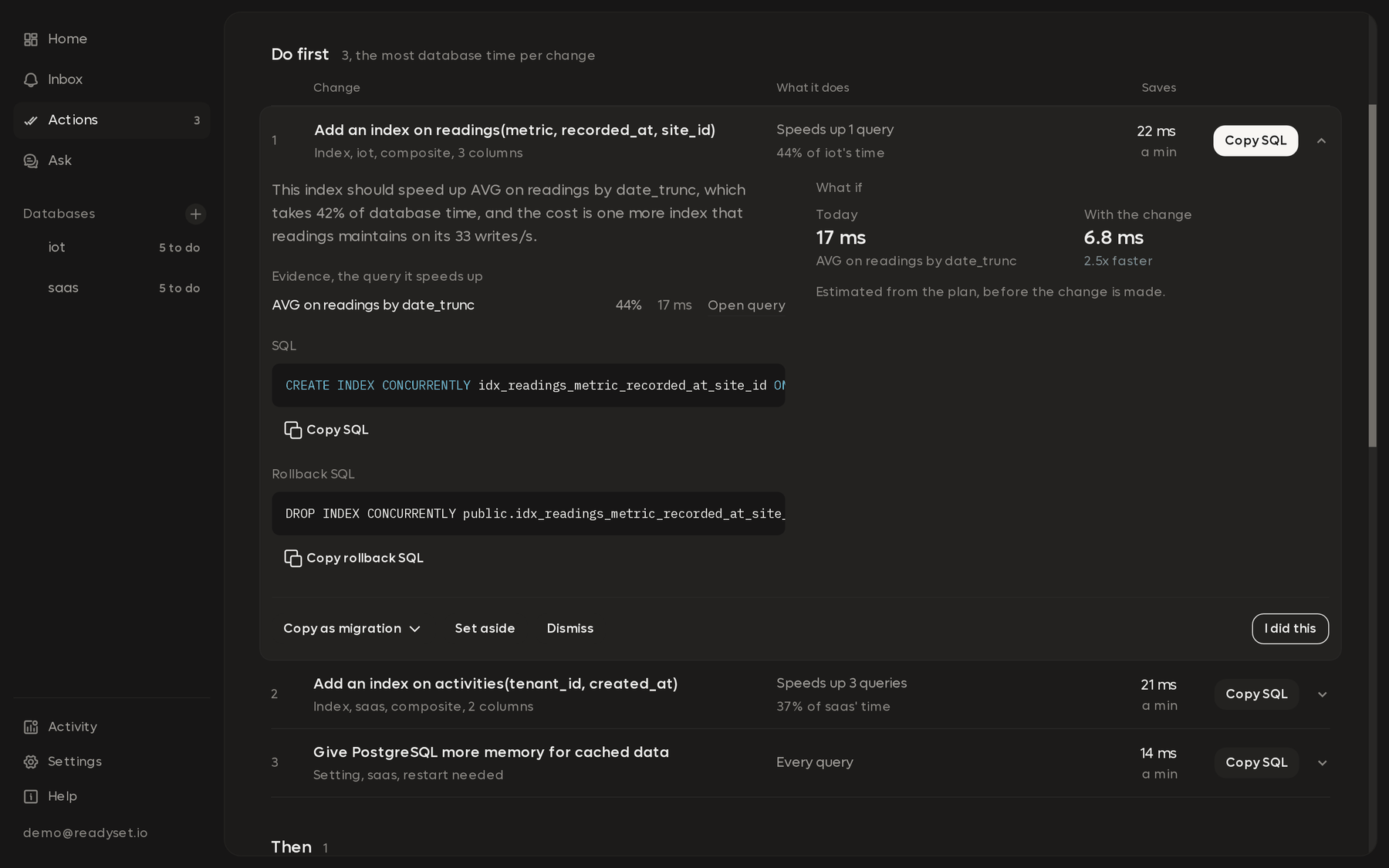
Open an action to see its steps, its SQL and the queries it affects. From there:
| Choice | What it does |
|---|---|
| Copy the SQL | Copies the statements to run, and the undo statements where there are any |
| Copy as migration | Copies the change as a migration for Alembic, Prisma, Rails or Flyway |
| I did this | Tells RDST you made the change. It rereads the database's indexes and statistics right away. If the change doesn't show yet, it says so and checks again in a few minutes |
| Set aside | Puts it away until a date you pick, with a reason. It comes back on its own after that |
| Dismiss | Closes it, with a reason. It stays closed until you bring it back, whatever the database does |
| Bring back | Reopens something you set aside or dismissed |
A rewrite asks you to check that it returns the same rows before you ship it.
After you make a change
RDST closes an action on its own when the fix shows up in the database: the new index exists, the dropped index is gone, the setting moved the way the action asked, the maintenance ran, or the old query stopped running in favor of the rewrite. You don't need to press I did this for that to happen.
For an index or a rewrite, RDST then measures the queries it was meant to help, before and after the change:
- Verified means they got faster, with the before and after latency.
- Didn't help means they didn't, and the change may be worth undoing.
Applied changes, with these results, stay in the action history. You can undo an index change with its undo SQL and tell RDST with I undid this.
An action also closes when its evidence fades, for example when the query it was about stops carrying load. If the same problem comes back later, the action reopens.
Actions and the Inbox
The Inbox holds things that happened and need you, like a query that slowed down or a lost connection. Actions holds the standing list of changes worth making. When new changes are ready for a database, the Inbox gets one item that points to them.
Without AI
Database checks and the index plan's measurements run without AI, so settings, maintenance and drop-index actions keep coming with local monitoring. Changes that come from deep analysis, the AI ranking and the written explanations need AI monitoring. See AI access.
Turn on monitoring
Check that RDST can see your database's query statistics, pick how deep analysis reads a query, and watch the first readings arrive.
The Database page
See how busy your database is right now and which queries take up most of its time. Each query shows whether it's healthy and the score from its last deep analysis.