Private databases
Reach a database that has no public endpoint by tunnelling through an SSH jump host, without changing a security group or running a VPN.
Most production databases are not reachable from a laptop, and that is the right call. RDST connects to them the same way you already do: over SSH, through a bastion.
You give RDST the jump host and the key. It opens the tunnel, forwards a local port to the database, and tears the tunnel down when it is finished. Nothing changes on the database, and no security group is opened.
Configuring a jump host
Open the target in Settings, or start a new one with Add Target, and expand Connect via SSH jump host.
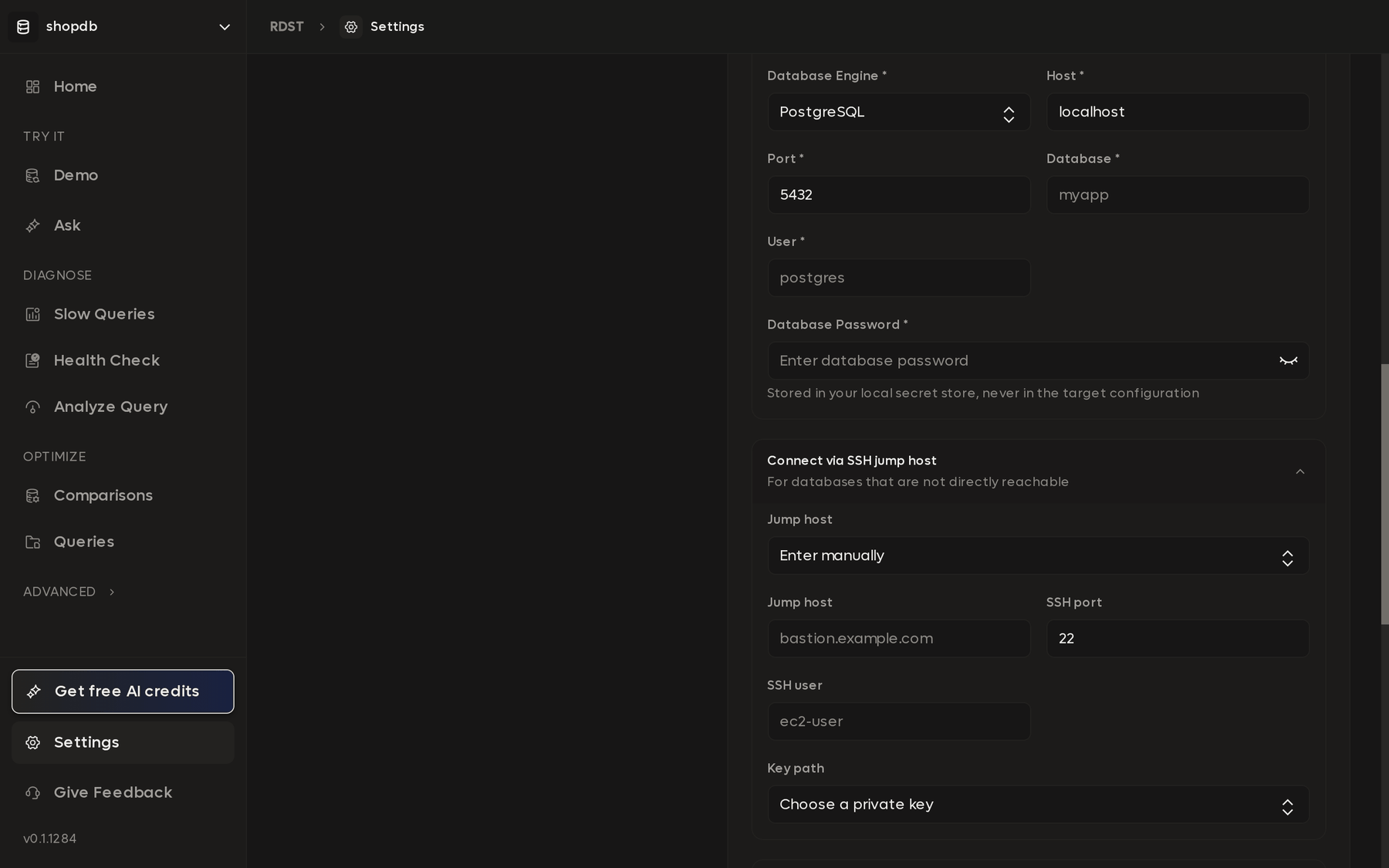
Enter the database details as if you were on its network. Host, port, and database name are the ones the jump host would use, normally the private endpoint. Do not put the jump host in the Host field.
Choose a jump host. Pick one you have already configured, or Enter manually to add a new one.
Fill in the jump host, SSH port, and SSH user. For an Amazon Linux
bastion the user is usually ec2-user; on Ubuntu it is ubuntu.
Choose the private key. Key path lists the keys RDST finds in your
.ssh directory. RDST reads the key to open the tunnel and never copies it.
Test connection. This opens the tunnel and runs a real query through it, so a pass means the whole path works, not just that the bastion accepts SSH.
Once saved, the target carries a Tunnel active badge in the target list whenever its tunnel is up. Everything else in the app treats it like any other database.
Reusing a jump host
A jump host is stored once and reused. If one bastion reaches five databases, you configure it a single time and select it for each of them. Editing it later updates every target that points at it.
This also means the two are independent. A jump host that can reach one database cannot necessarily reach another, because the security group between the bastion and each database is what decides. If a target fails to connect while its neighbour succeeds through the same bastion, look at that path rather than at RDST.
Discovery does not add a tunnel
Importing a private instance from AWS gives you its endpoint but not a route to it. The discovery drawer says so directly: import it first, then add an SSH jump host in its connection details.
An imported instance with Publicly accessible: No will fail its first connection test. That is expected. Add the jump host and test again.
RDST holds the tunnel open only while it is working. A health check that runs for two minutes keeps the tunnel for two minutes. There is no background process left behind, and nothing to shut down afterwards.
When SSH is not enough
A jump host suits a database sitting in a private subnet with a bastion in front of it. Two situations it does not cover:
No bastion at all. If the network is reachable only over a VPN or a private link, connect to that network first. RDST uses your machine's routing, so once your laptop can reach the database, so can RDST.
A database that nothing outside the cluster may reach. Run RDST next to it
instead. Install the CLI on a host inside the network
and use rdst web with SSH port
forwarding, which puts this same interface in your browser while the database
connection stays inside the perimeter.
Supabase, Neon, and DigitalOcean
Connect a managed Postgres or MySQL provider, find your projects, and pick the databases you want instead of copying connection strings by hand.
Database permissions
Minimum PostgreSQL and MySQL privileges for RDST Desktop, with optional grants for monitoring and Health Check.