← Back to blogDatabase Scaling
What Is Database Sharding, and When Should You Shard?
Sharding splits one logical database across independent servers so each holds only part of the rows. How to shard is well documented; when to shard is the hard call. Here are the three conditions that justify it, why a database past 2 to 4 TB usually needs it, and the read load you can cache away instead.
Vinicius Grippa
2026-11-10 · 13 min read
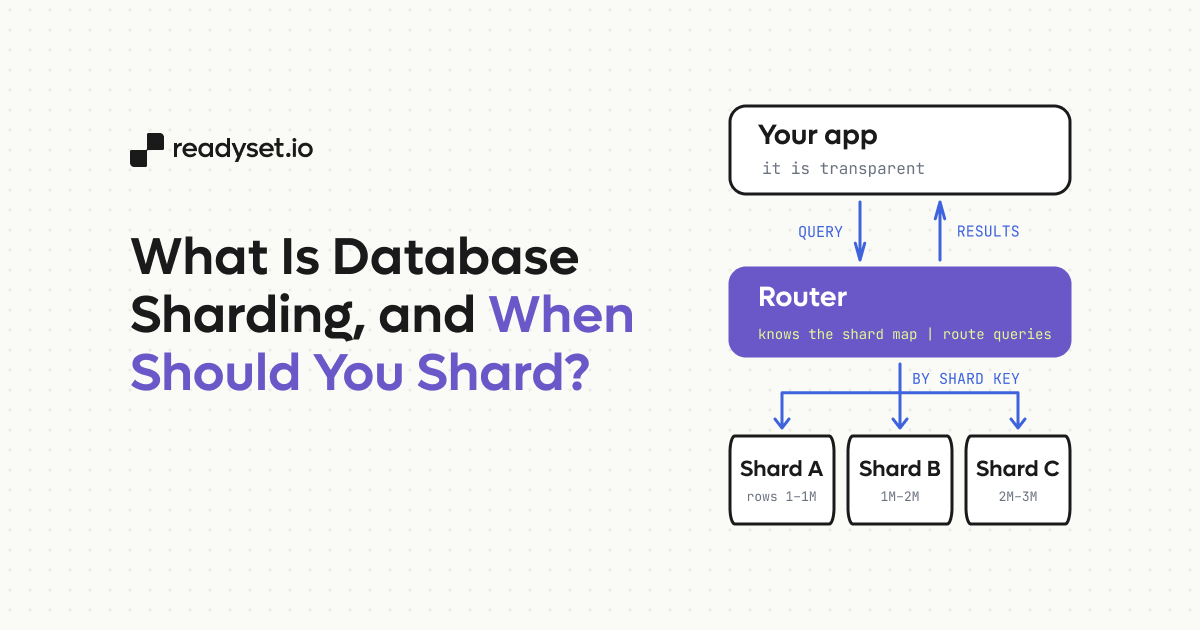
Database sharding splits one logical database across several independent database servers, called shards, so that each server stores and serves only part of the rows. A shard key, such as a customer ID or a tenant ID, decides which shard owns each row, and a routing layer sends every query to the shard that holds its data. Sharding lets a relational database grow beyond the storage, memory, and write capacity of a single machine.
How to shard is well documented. When to shard is harder, because sharding is close to a one-way door: once rows live on different servers, every cross-shard join and schema change costs more, and undoing it means migrating the data back. We decide with three conditions: the data, the working set, or the write load has outgrown what one server can handle. For MySQL and Postgres, we add a size rule from experience: once a single database heads past 2 to 4 TB, its routine operations, restores in particular, stop fitting inside recovery and change windows, and that is the time to start planning a shard.
What is database sharding?
Each shard in a sharded database is a complete database server, with its own storage, buffer pool, replicas, and backups. The shards share a schema and hold different rows. A table of three million customers might keep customers 1 to 1 million on shard A, the next million on shard B, and the rest on shard C, so a query for customer 1,500,042 only ever touches shard B.
The router is whatever knows that mapping. In many MySQL and Postgres shops, it's the application, which holds a shard map and opens a connection to the right server. It can also be a proxy layer such as Vitess for MySQL, or an extension such as Citus for Postgres, both of which present the shards to the application as a single database.
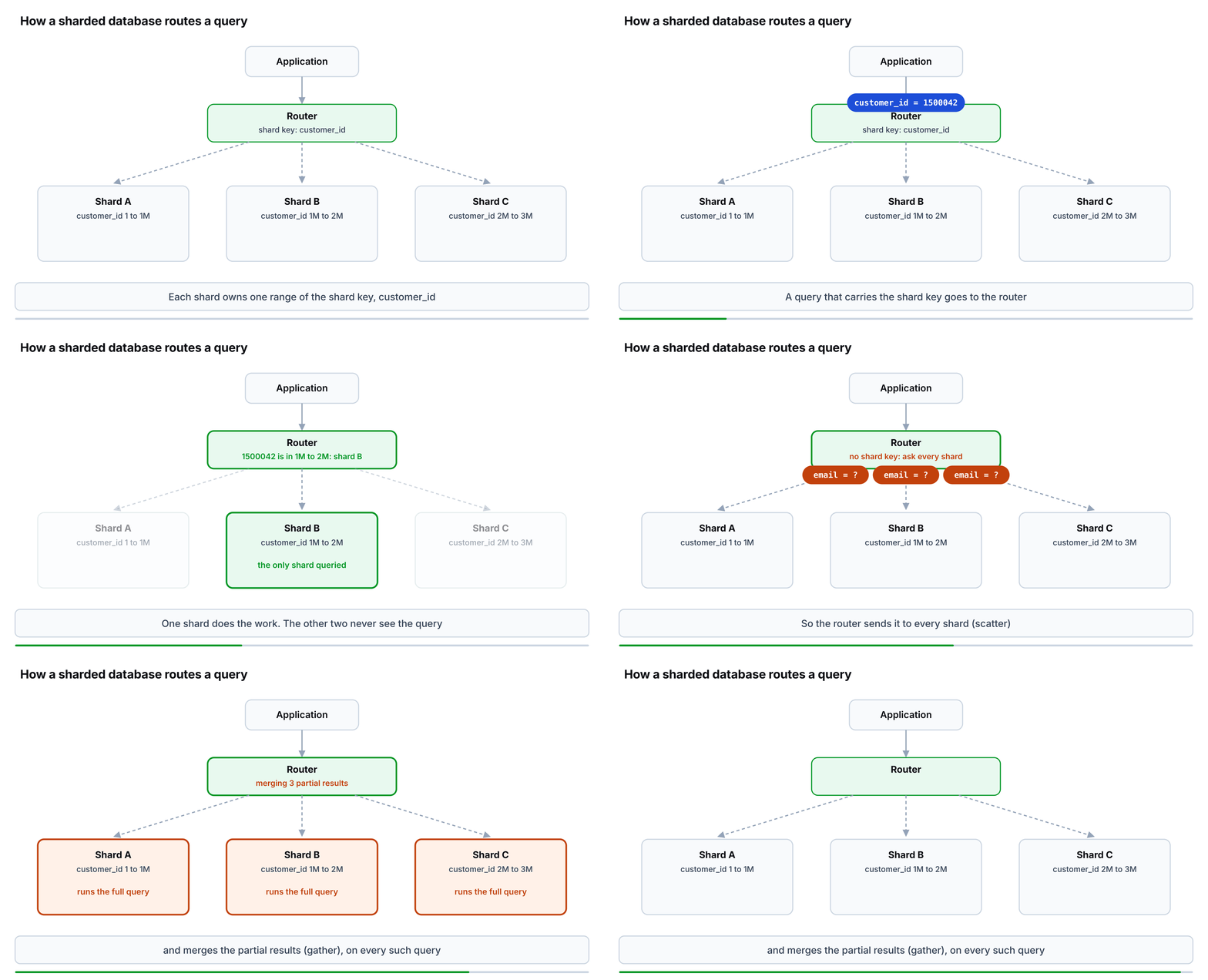
A query that carries the shard key runs on one shard. A query without it runs on every shard, and the router merges the results, a pattern known as scatter/gather.
Sharding gets confused with partitioning and with replication, and the three solve different problems. Partitioning splits a table by a key too, but the partitions all stay on one server and share its disk, memory, and backup. Replication copies every row to more servers, which spreads reads and adds failover targets while leaving each server just as large as before. Only sharding makes each server smaller.
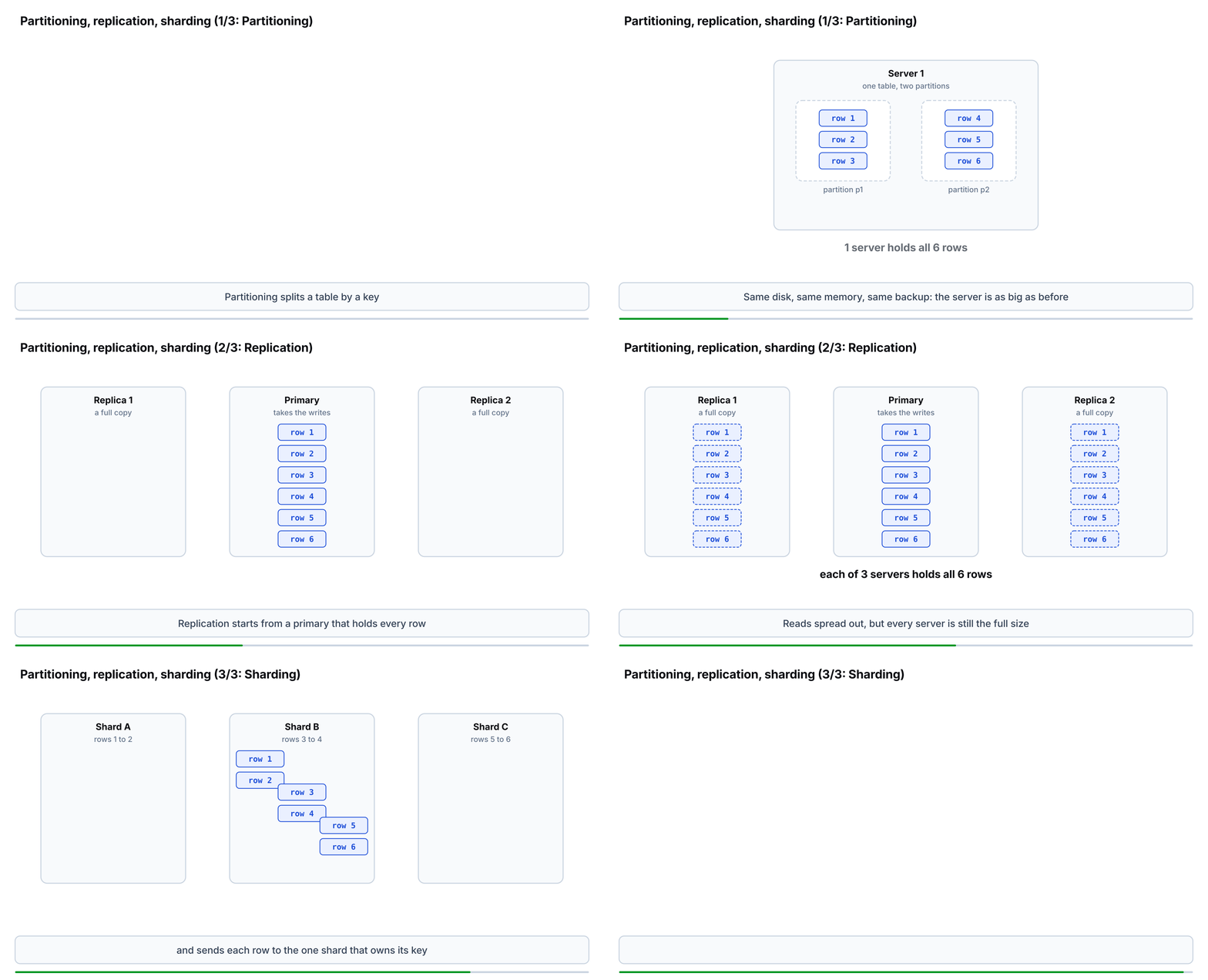
Six rows, three placements. Partitioning keeps all six on one server, replication puts all six on each of three servers, and sharding leaves two on each.
| Partitioning | Replication | Sharding | |
|---|---|---|---|
| Where the rows live | All on one server | Full copies on every server | Different rows on different servers |
| What it scales | Maintenance of one large table: pruning scans, dropping old data | Reads and availability | Storage, memory, writes and reads |
| Who routes queries | The database engine | The application or a proxy, to the primary or a replica | The application, a proxy or an extension, by shard key |
| Size of each server | Unchanged | Unchanged: each replica holds everything | A fraction of the whole |
Partitioning, replication and sharding compared. Partitioning and replication both leave one server holding the full data set, so neither shortens a backup or a restore.
When should you shard a database?
We recommend sharding a MySQL or Postgres database when at least one of three conditions holds:
- The data has outgrown what one server can handle. The limit is not what the engine can store but the size at which backups, restores, and schema changes no longer fit your recovery and change windows.
- The working set is about to outgrow memory. The rows and index pages your queries touch every minute no longer fit in the InnoDB buffer pool, or in Postgres shared buffers plus the operating system cache, so reads start going to disk.
- One primary can't absorb the writes, and batching, trimming secondary indexes, and faster storage have stopped helping.
If none of the three holds, sharding adds complexity and buys little. These are the same conditions MongoDB's documentation lists in its current manual, which suggests considering sharding once a collection reaches 3TB, a size range we already see in MySQL and Postgres.
Each condition shows up in MySQL and Postgres in a recognizable way, and each has cheaper fixes to try first:
| Condition | How it shows up in MySQL and Postgres | What to try before sharding |
|---|---|---|
| The data outgrows what one server can operate | Backups, restores, and schema changes outgrow their windows long before the disk fills | Archive or delete cold rows; partition by time and drop old partitions; compress |
| The working set outgrows memory | The InnoDB buffer pool or Postgres cache hit ratio falls and read I/O climbs with traffic | A larger instance, better indexes, read replicas, or a cache for the hot reads |
| One primary can't absorb the writes | Writes saturate the primary's CPU or disk, commit latency rises, replicas lag | Batch writes, drop unused secondary indexes, move to faster storage |
The three sharding conditions as they show up in MySQL and Postgres. The fixes in the right-hand column buy time; for the write condition they rarely buy much, because one primary still takes every write.
The first condition is about operating the data, not storing it. InnoDB allows a table of up to 64 TB with the default 16 KB page, and a Postgres table can reach 32 TB with the default 8 KB block. Those are theoretical ceilings, and no one should run a database anywhere near them: performance starts falling apart long before a table gets close. Once the working set outgrows the InnoDB buffer pool, or Postgres shared buffers plus the operating system cache, index lookups and inserts turn into random disk reads. In Postgres, a vacuum pass over a multi-terabyte table can run for hours and fall behind the rate at which the table creates dead rows. The practical limit is the size at which one instance gets too slow to run and too slow to operate, which is what our 2 to 4 TB rule measures.
Timing matters more than any threshold. Sharding has to start while the database still has headroom, because moving rows onto new shards takes spare I/O and CPU from the very server you're trying to relieve. On MySQL or Postgres, where sharding usually means choosing a key, changing the application, backfilling, and cutting over, the project runs for months. Hence, the decision belongs to the months before the database runs out of capacity, not the week after.
Sharding costs are why you wait for one of the three conditions. A query that doesn't carry the shard key has to run on every shard, and a scatter/gather query like that is only as fast as the slowest shard. Joins and transactions across shards move into the application or into a distributed transaction protocol. Unique constraints and auto-increment IDs need a scheme that works across servers. Every backup, upgrade, and failover now happens once per shard. The shard key itself is the hardest choice to reverse, so it deserves the most design time before the first row moves.
How large can a MySQL or Postgres database get before you shard it?
Our rule of thumb is to start planning a shard once a single MySQL or Postgres database heads past 2 to 4 TB. The range comes from what we've seen in production rather than from a formula, and the restore arithmetic later in this section shows why it lands where it does. The limit has nothing to do with what the engine can store. It comes from how long ordinary operations take once the data is that large: building an index, changing a schema, taking a backup and, above all, restoring one. Treat the range as a starting point; your own number comes from your recovery time objective and a timed restore.
Index builds and schema changes take longer as tables grow, and their online versions have failure modes that get likelier the longer they run. MySQL's documentation on online DDL limitations says an online data definition language (DDL) operation "must finish running on the source before it is run on the replica", so a six-hour index build on the source becomes roughly six hours of replication lag on every replica. Writes that arrive during the build are buffered in a temporary log capped by innodb_online_alter_log_max_size, 128 MiB by default, and when that log fills, "the ALTER TABLE operation fails and all uncommitted concurrent DML operations are rolled back." In Postgres, CREATE INDEX CONCURRENTLY "must perform two scans of the table" and wait for every transaction that could use the index, and a failure leaves behind an invalid index that is ignored by queries but "will still consume update overhead."
At 200 GB, adding an index is something an engineer does before lunch. At 4 TB the same change needs a maintenance window and someone watching replica lag until it finishes. When a simple DDL change takes that much planning, the database has reached its practical size limit, whatever the disk says.
Restore time sets the hard ceiling. The recovery time objective (RTO) is the downtime the business accepts after a failure, and a database you can't restore within it is too large, however well it runs day to day. A restore has to move every byte of the backup onto a working volume before anything else can happen, and that copy alone takes data size divided by throughput. Amazon Elastic Block Store (EBS) includes 125 MiB/s of baseline throughput with every gp3 volume, and gp3 can be provisioned up to 2,000 MiB/s, provided the instance has that much EBS bandwidth. A volume created from a snapshot can be initialized at up to 300 MiB/s at extra cost.
| Data size | At 125 MiB/s | At 300 MiB/s | At 2,000 MiB/s |
|---|---|---|---|
| 1 TiB | 2 h 20 min | 58 min | 9 min |
| 2 TiB | 4 h 40 min | 1 h 57 min | 17 min |
| 4 TiB | 9 h 19 min | 3 h 53 min | 35 min |
| 8 TiB | 18 h 38 min | 7 h 46 min | 1 h 10 min |
Time to copy a backup onto a working volume, by data size and throughput. This is arithmetic, not a measurement, and it is the fastest a restore can possibly go: it excludes index rebuilds, log replay and warm-up.
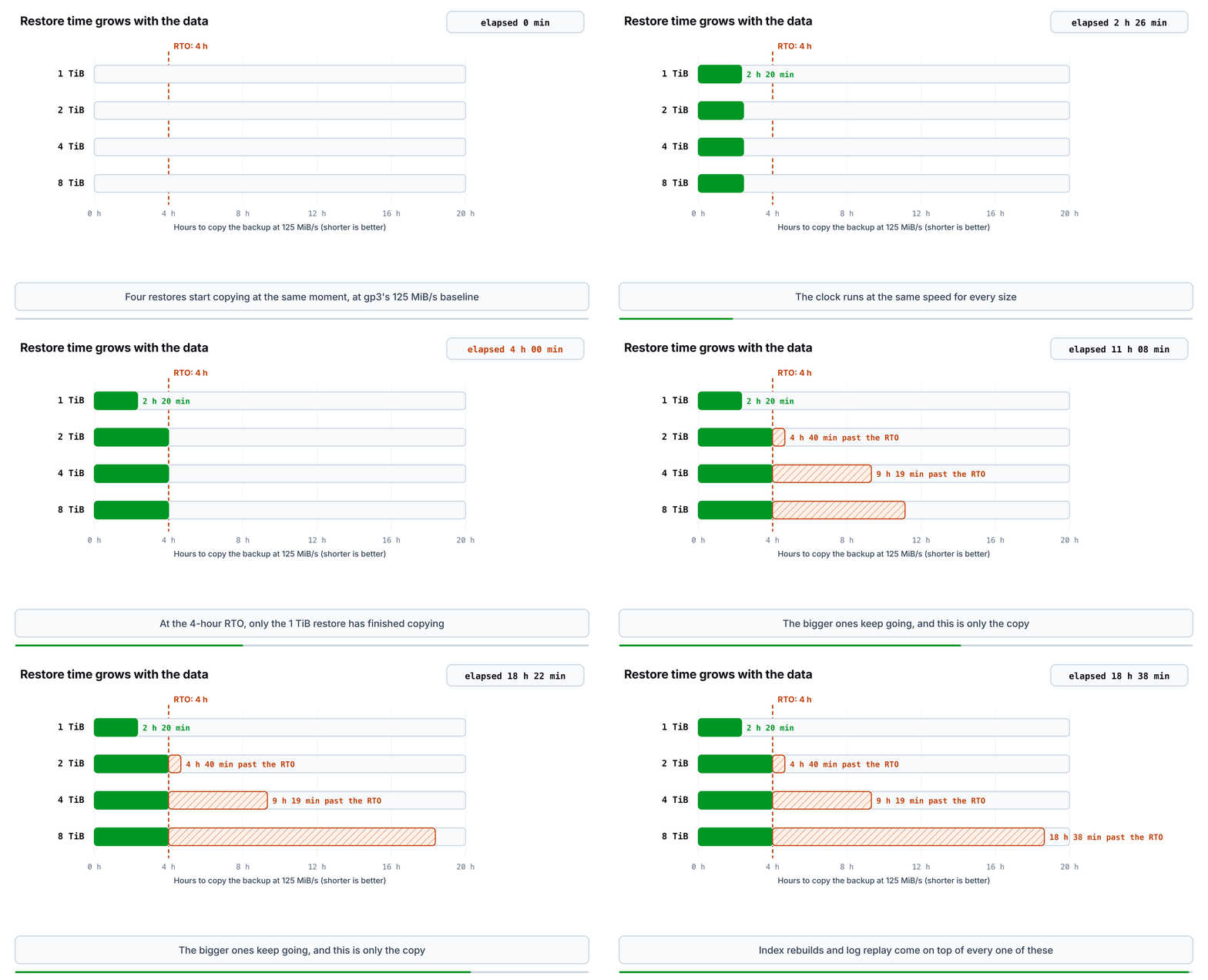
The restore-floor table as a clock, at gp3's 125 MiB/s baseline. With a 4-hour RTO, only the 1 TiB database has finished copying when the time is up.
A real restore is slower than the copy. A logical restore with mysqldump or pg_dump rebuilds every index after loading the rows. Point-in-time recovery then replays the MySQL binary log or the Postgres write-ahead log (WAL) from the backup up to the moment of failure. A volume restored from an EBS snapshot pulls its blocks from Amazon S3 on first access, and AWS warns it "might experience increased I/O latency and decreased performance" until every block has arrived. The replicas lost in the same incident need rebuilding too, and until they are, the restored primary has no failover target.
To find the limit for your own database:
- Restore a production-sized backup on production-class hardware, end to end and including point-in-time recovery, and time it. Data size divided by that time is your effective restore throughput.
- Multiply that throughput by your RTO, after subtracting the time it takes to notice the failure and decide to restore. The result is the largest database you can recover in time.
- Time the largest index build or
ALTER TABLEon your biggest table, along with the replica lag it causes. If that doesn't fit your change windows, your limit is lower than the restore says. - Compare your growth rate with how long a sharding project takes your team, and start when you're that far from the limit rather than at it.
As an example, a team with a four-hour RTO whose measured end-to-end restore runs at 150 MiB/s can recover 14,400 seconds × 150 MiB/s = 2,160,000 MiB, or 2.06 TiB, before detection time is taken off. Double the throughput to 300 MiB/s and the same four hours cover 4,320,000 MiB, or 4.12 TiB. Those two results bracket our 2 to 4 TB rule: a four-hour RTO and a restore pipeline sustaining 150 to 300 MiB/s end to end puts the ceiling for one database in that range. A team with a shorter RTO or a slower restore gets a lower number, and should start the sharding work well before reaching it.
Which scaling problems can you solve without sharding?
Read pressure is the one reason to shard that has a good answer short of sharding. Data size and restore time are properties of the data itself, and write throughput is a property of the single primary, so only splitting the data (or deleting some of it) changes them. Reads behave differently. Applications ask for the same results over and over, and serving those results from somewhere other than the primary takes load off it without moving a single row.
Readyset is a cache built for that case. Readyset sits between the application and MySQL or Postgres, speaks their wire protocols, and answers cached queries from memory. A deep cache stays current by applying changes from the MySQL binary log or the Postgres WAL through incremental view maintenance, so a write shows up in the cached result without the application invalidating anything. A shallow cache refreshes its results on a time-to-live (TTL) instead. Writes and uncached queries pass through to the database unchanged.
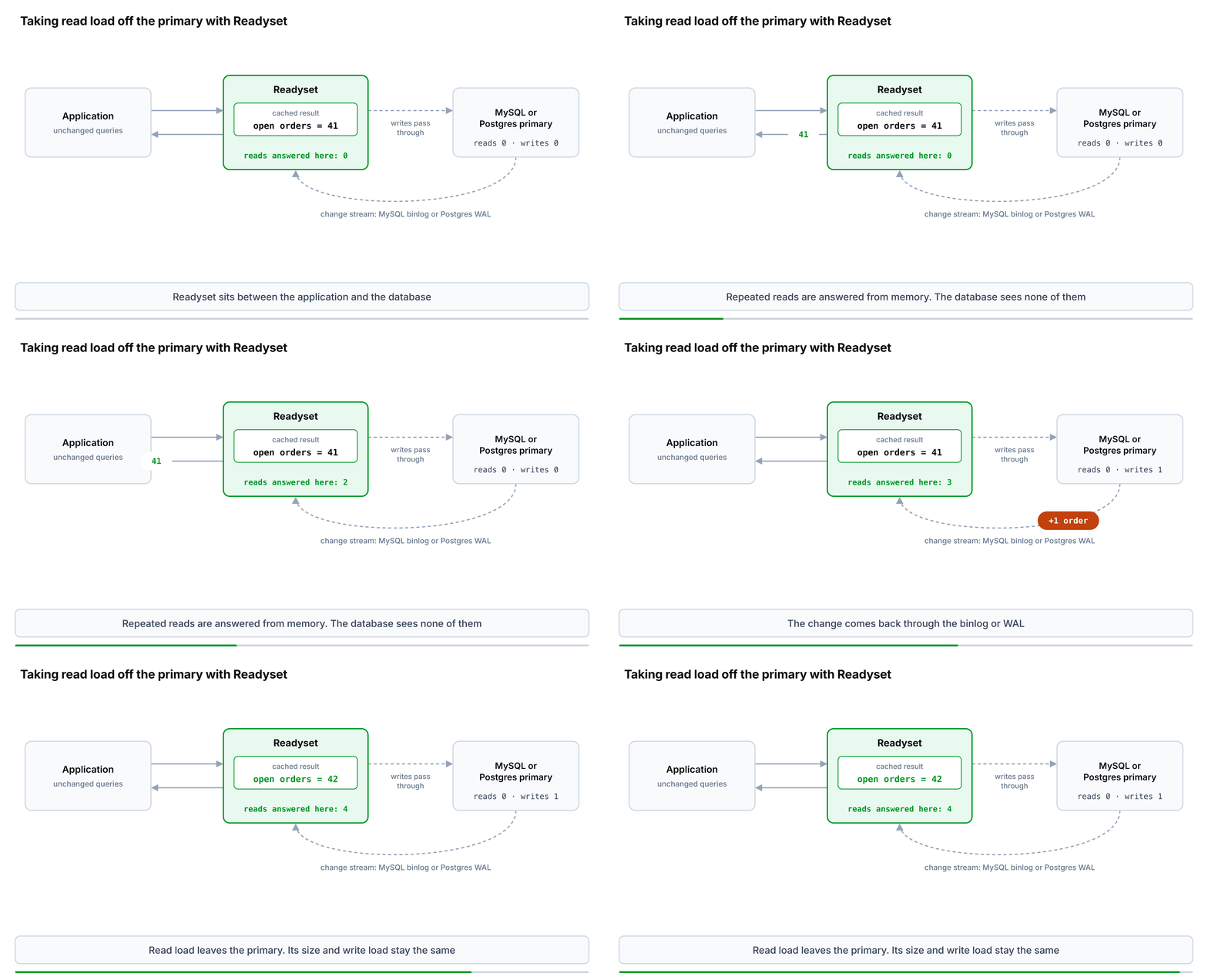
Repeated reads stop at Readyset. The write reaches the primary, and the change returns through the MySQL binlog or Postgres WAL to update the cached result in place.
| Reason you're considering sharding | Read replicas | Readyset | Sharding |
|---|---|---|---|
| Repeated reads saturate the primary | Helps, with replication lag on every replica | Helps: repeated queries are answered from memory | Helps, at the cost of splitting the data |
| The working set is outgrowing RAM because of hot reads | Partly: every replica needs the same RAM as the primary | Helps for cached queries; the database still needs memory for writes and uncached reads | Helps |
| One server can't absorb the writes | No | No | Yes |
| Restores and DDL changes take too long | No: a replica rebuild is the same size as a restore | No | Yes |
| The data set is outgrowing one server's storage | No | No | Yes |
Which tool addresses which sharding trigger? Readyset and read replicas only act on read load; size, restore time, and write throughput need the data split.
Readyset doesn't shrink the database or shorten a restore. If a restore already takes longer than your RTO, caching reads leaves that problem exactly where it was. When read load is what's pushing you toward sharding, a cache moves the date: it buys back the headroom that sharding needs before it starts, so the work runs on a schedule instead of during an incident.
Readyset also works inside a sharded fleet. Readyset connects to a single upstream database, so in an application-sharded MySQL or Postgres deployment each shard gets its own Readyset, and the shard map points at that Readyset instead of at the shard's primary. Each cache then holds results for one shard's rows only. The router still merges queries that fan out across shards.
The number behind most of these decisions is how long a full restore of your largest database takes, and it's cheap to measure before anything depends on it. If reads are what's pushing you toward sharding first, the Readyset documentation covers putting a cache in front of a single MySQL or Postgres database.
Related articles
Continue reading more about database scaling.
Database ScalingVinicius Grippa
Caching Supabase with Readyset over IPv6: the AWS and Docker pieces that have to line up
Supabase's direct Postgres endpoint is IPv6-only, and a fresh AWS account has no IPv6 enabled. This walkthrough covers the exact VPC, subnet, and Docker configuration needed to run Readyset in front of Supabase on EC2, with three deployment paths: host network, dual-stack bridge, and Linux package.
2026-07-1817 min read
Database Scaling Gautam Gopinadhan
The Hidden Complexity of Postgres Scaling Architectures
The OpenAI Postgres scaling article has been making the rounds, and for good reason. The piece does two things extremely well. First, it shows just how Postgres can be pushed far beyond what most teams assume is possible. Second, it makes clear that workloads at this scale don’t run on databases alone; they rely on caching, proxies, and careful query traffic management. It’s a rare public look at what it actually takes to run Postgres at serious scale. Why Scaling PostgreSQL at High Traffic
Gautam Gopinadhan2026-01-274 min read
Database Scaling Tanmay Sinha
Does Your Black Friday Database Scaling Strategy Involve Duct Tape and Prayers?
It Might Be Time to Rethink How You Scale MySQL for Peak Demand As Black Friday and Cyber Monday approach, many engineering teams prepare for their annual database performance stress test. The surging traffic, unpredictable spikes, and sleepless nights spent watching database dashboards. The typical response is familiar: add more replicas, increase compute resources, and pray everything holds. But this approach to database scaling is reactive, costly, and fragile. What begins as a quick fix be
Tanmay Sinha2025-10-214 min read