← Back to blogProduct Updates
Meet the RDST Agent
When a query gets slow, a customer usually notices first. The RDST Agent catches it before that. It’s a free, always-on agent that runs on your computer, watches every query on your Postgres or MySQL database, and hands you the exact fix when something changes, the slow query, the plan, and the index to add.
Readyset Team
2026-10-14 · 6 min read
An always-on agent that catches every slow query on your PostgreSQL or MySQL database and gives you the exact fix. It runs on your computer.
Product Updates | Readyset team | October 14, 2026
When a query gets slow, a customer usually notices first. The RDST Agent is built to catch it before that. It's a free, always-on agent that runs on your computer, watches every query on your Postgres or MySQL database, and hands you the exact fix.
Teams with a DBA or a monitoring budget usually have tooling that watches for this. A lot of teams running Postgres or MySQL on RDS, Supabase, Neon or their own servers don't, so query performance tends to get checked after something breaks.
Today we're releasing the RDST Agent, a free, always-on agent that runs on your computer, catches every slow query on your database, and gives you the exact fix when something goes wrong.
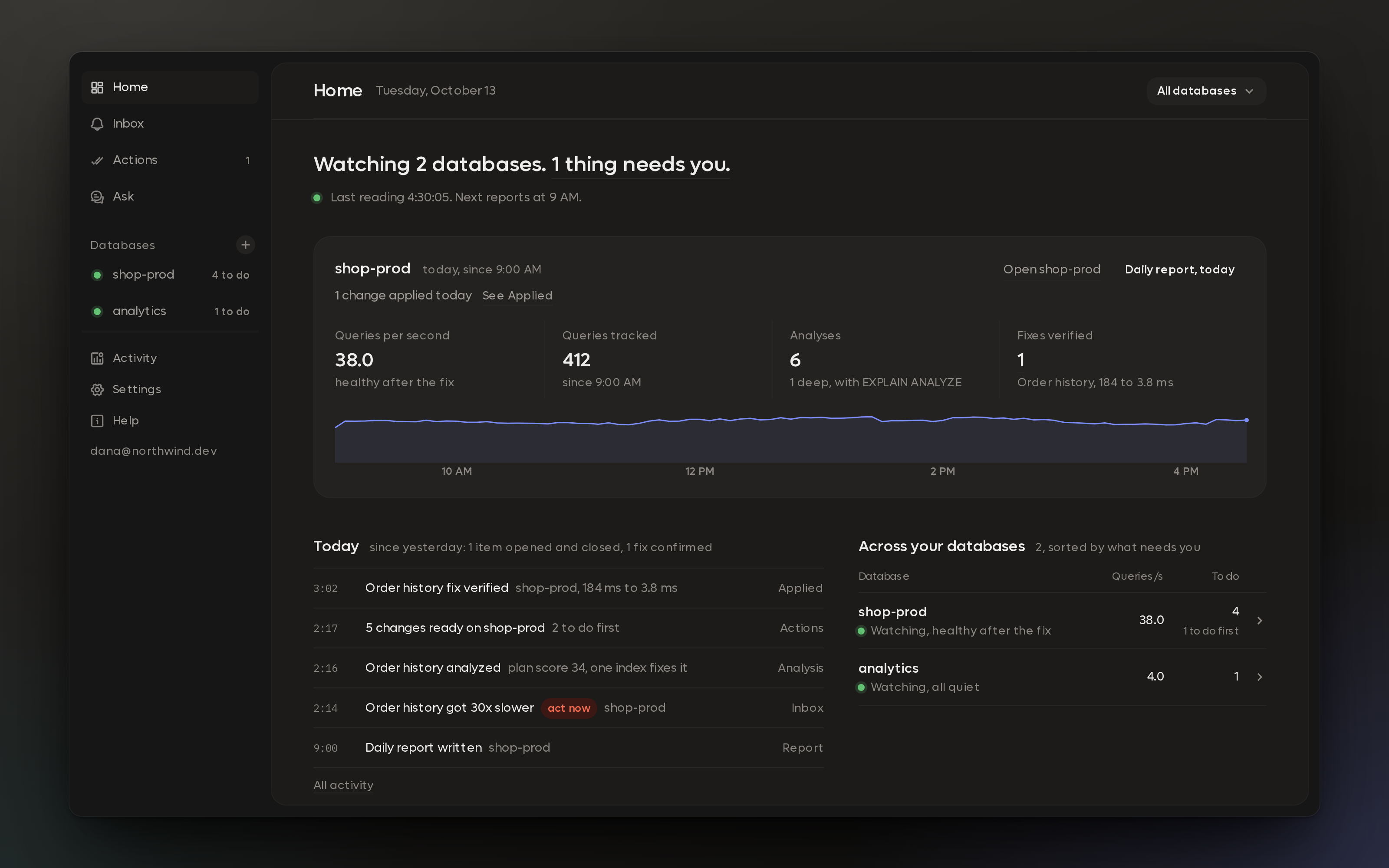
Home: two databases, one thing that needs you, and everything the agent did today.
To show what that looks like, we'll follow one afternoon on shop-prod, the PostgreSQL database behind an online store.
It keeps a history of every query
When you turn on monitoring, RDST reads your database's query statistics every minute, from pg_stat_statements on PostgreSQL or performance_schema on MySQL. It builds a history for every query: how often it runs, how long it takes and how much of the database's time it uses. The last 48 hours stay minute by minute, and older readings roll up into hourly and daily summaries that reach back months.
On shop-prod, the query behind the store's order history page usually takes about 6 ms. At 2:05 PM a deploy adds a new "My orders" page, and that same query starts taking 184 ms. Within minutes it's using almost a third of the database's time.
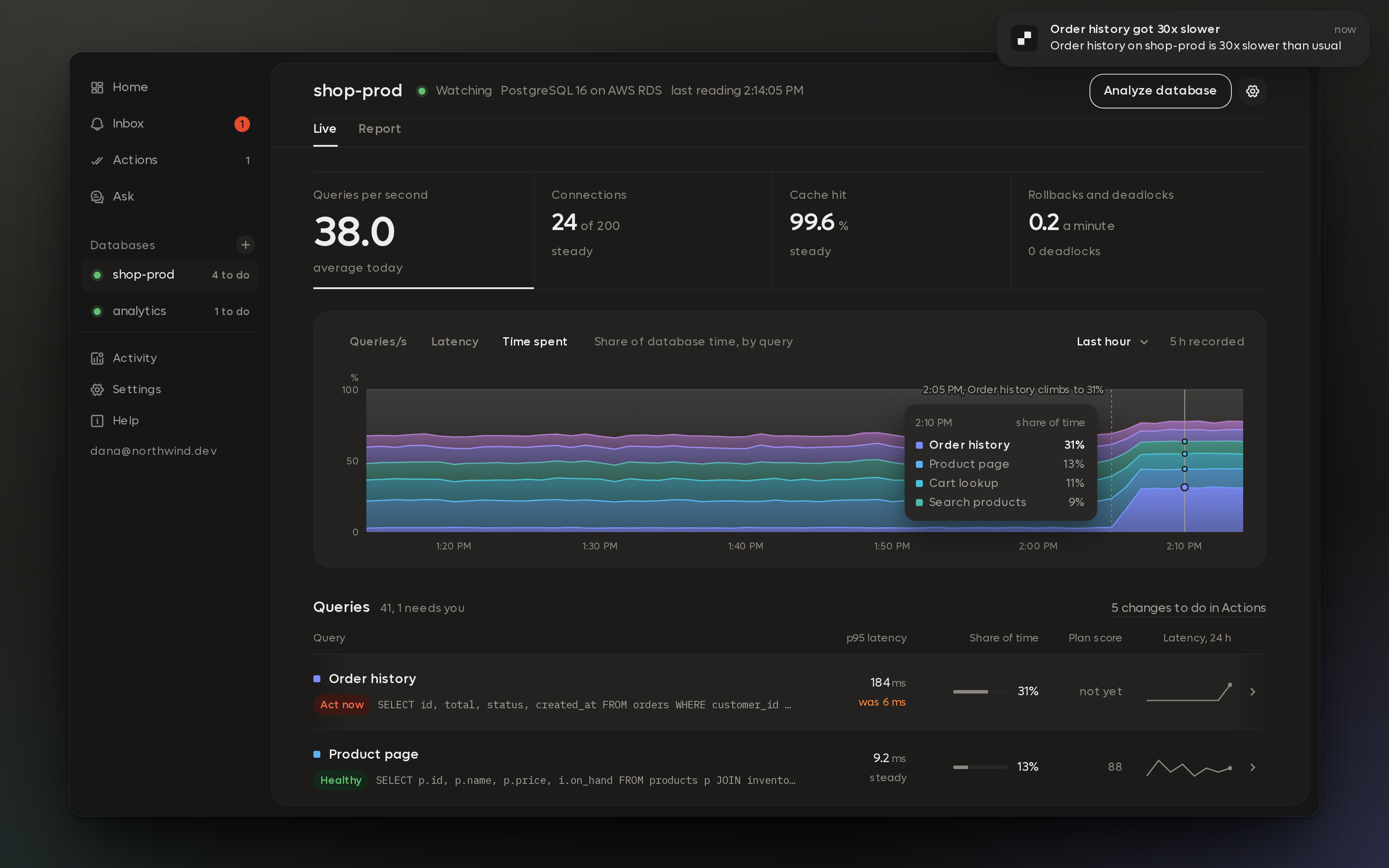
shop-prod at 2:14 PM. Order history jumps after the deploy, and the agent sends a desktop notification.
It notices, and it knows what's worth your time
Every 5 minutes the agent compares each busy query against its own history. It looks for queries that got slower or busier, changed plans, got stuck or started waiting on locks.
Most of those changes don't deserve an interruption. Jev, Readyset's attention model, decides which ones do. Order history getting 30x slower clears the bar, so at 2:14 PM it lands in the Inbox under Act now and a notification shows up on the desktop. Smaller wobbles stay on the chart for when you go looking.
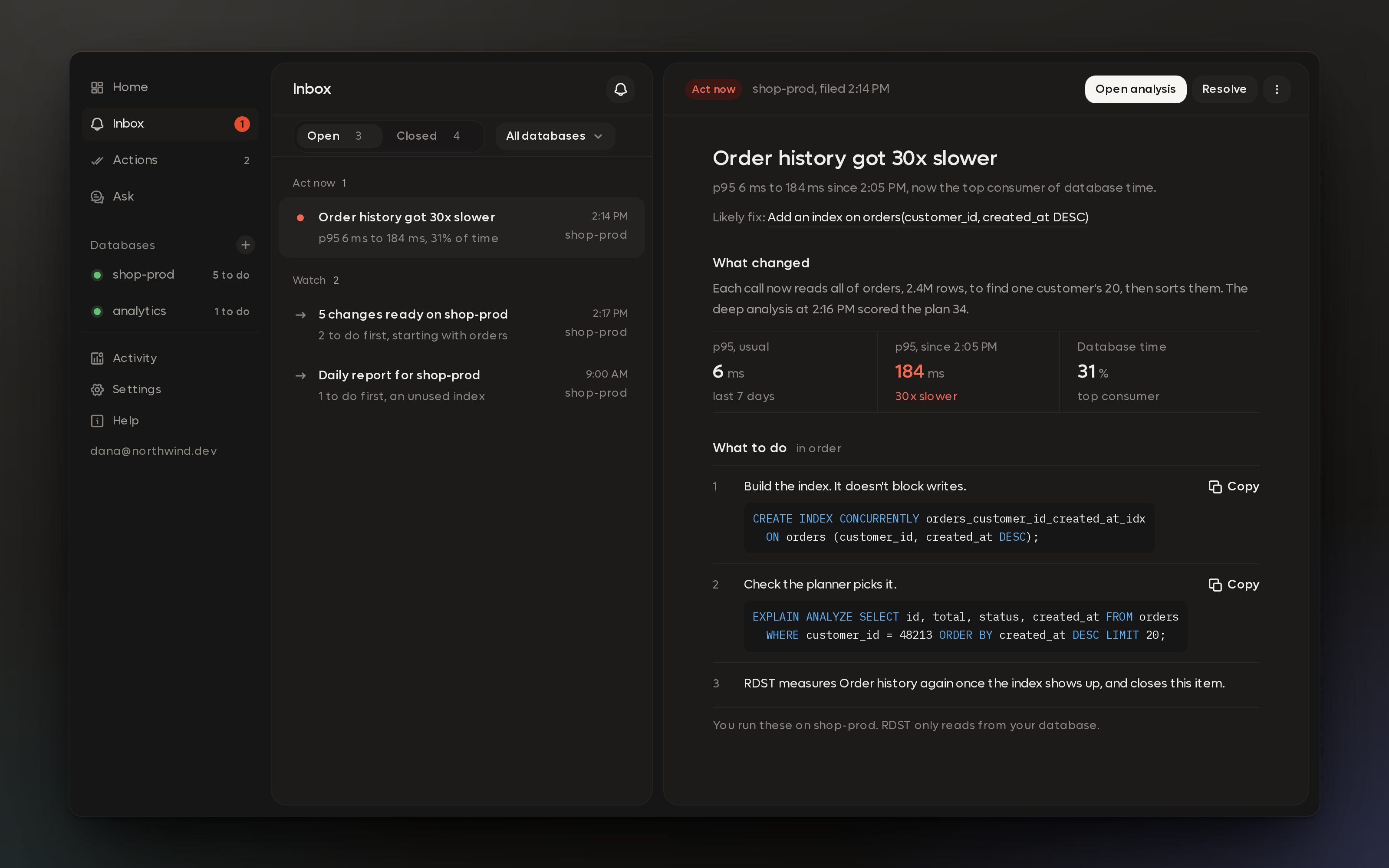
The Inbox item explains what changed and what to check, with the SQL for each step.
It does the analysis nobody has time for
Two minutes later, the agent has a deep analysis. It runs EXPLAIN ANALYZE on the query with a real customer_id sampled from live traffic, and the plan shows the problem right away. Postgres is reading all 2.4 million rows of orders to find one customer's 20 most recent orders. The fix is a composite index on customer_id and created_at.
New heavy queries get this treatment as they show up, and every night the agent writes a report for each database with what to fix first, along with checks for bloat, unused indexes, settings and replication.
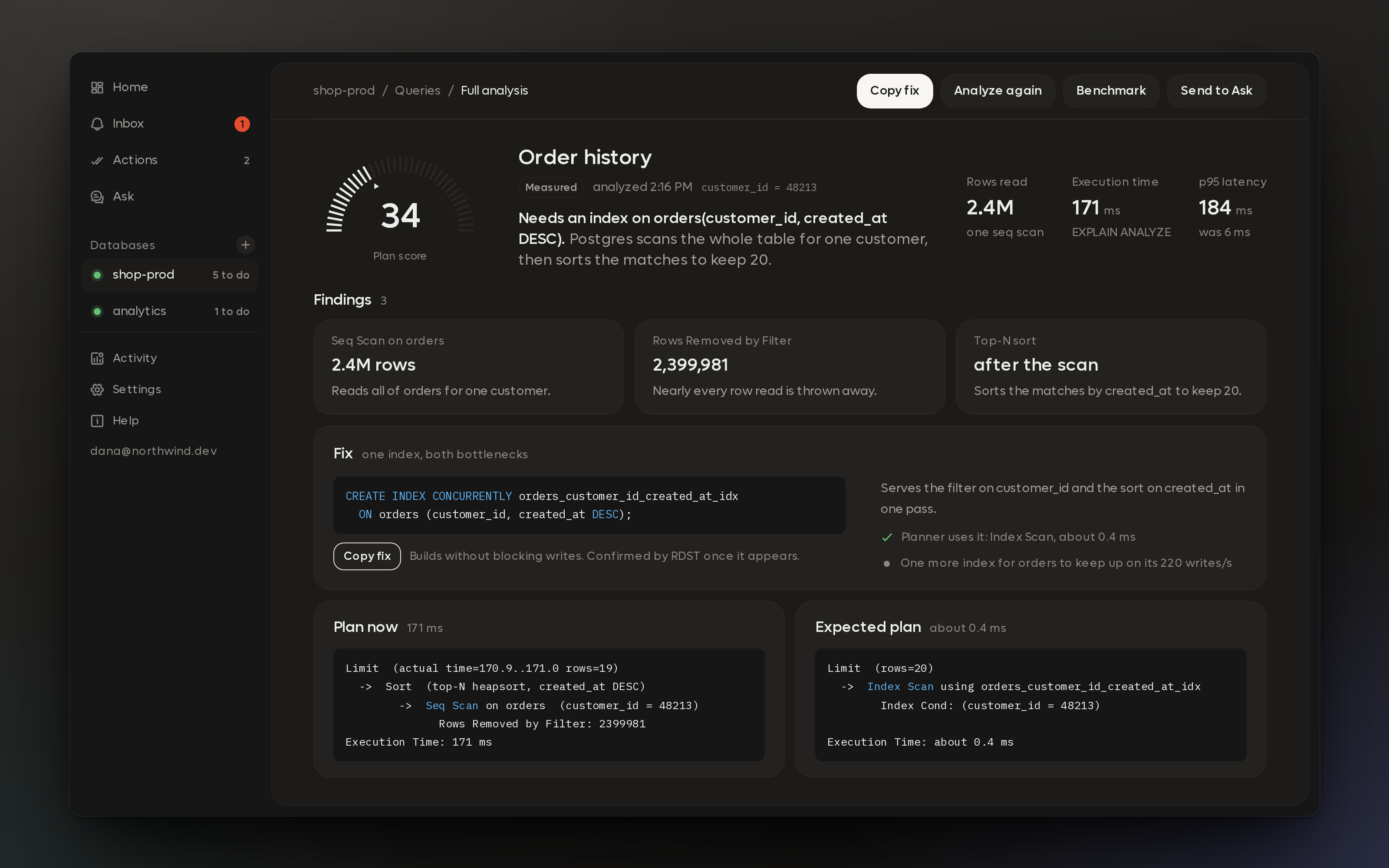
The analysis scores the query, shows what the plan is doing, and names the index to add.
Actions: one list of changes worth making
Everything the agent learns feeds Actions, a ranked list of the changes worth making across your databases. The new index goes straight to the top of Do first, because it saves about 7 seconds of database time every minute.
Right below it is an index to drop. orders_status_idx hasn't been used in 30 days, and every one of the 220 writes a second to orders still has to maintain it. The agent weighs each index against how often its table gets written to, so it'll recommend removing dead weight as readily as adding what's missing. Each action comes with the SQL to run and the SQL to undo it, and you can copy it as a migration for Alembic, Prisma, Rails or Flyway.
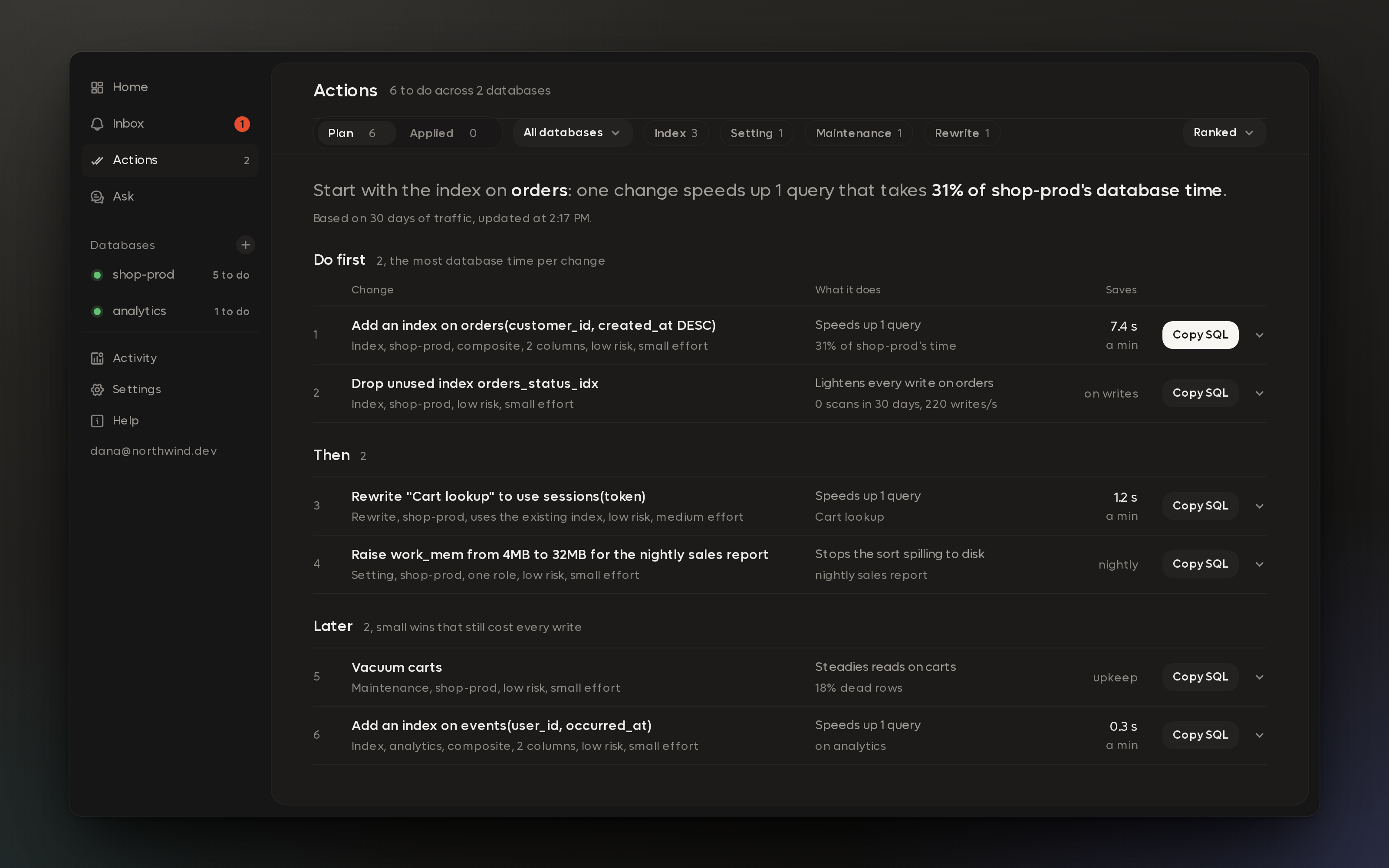
Actions for both databases, ranked into Do first, Then and Later.
RDST never writes to your database. You ship the change the way you ship any other migration, and the agent checks whether it worked.
At 3:02 PM the new index shows up on shop-prod. The agent measures Order history before and after: 184 ms down to 3.8 ms, and from 31% of the database's time to 2%. The action closes as Verified.
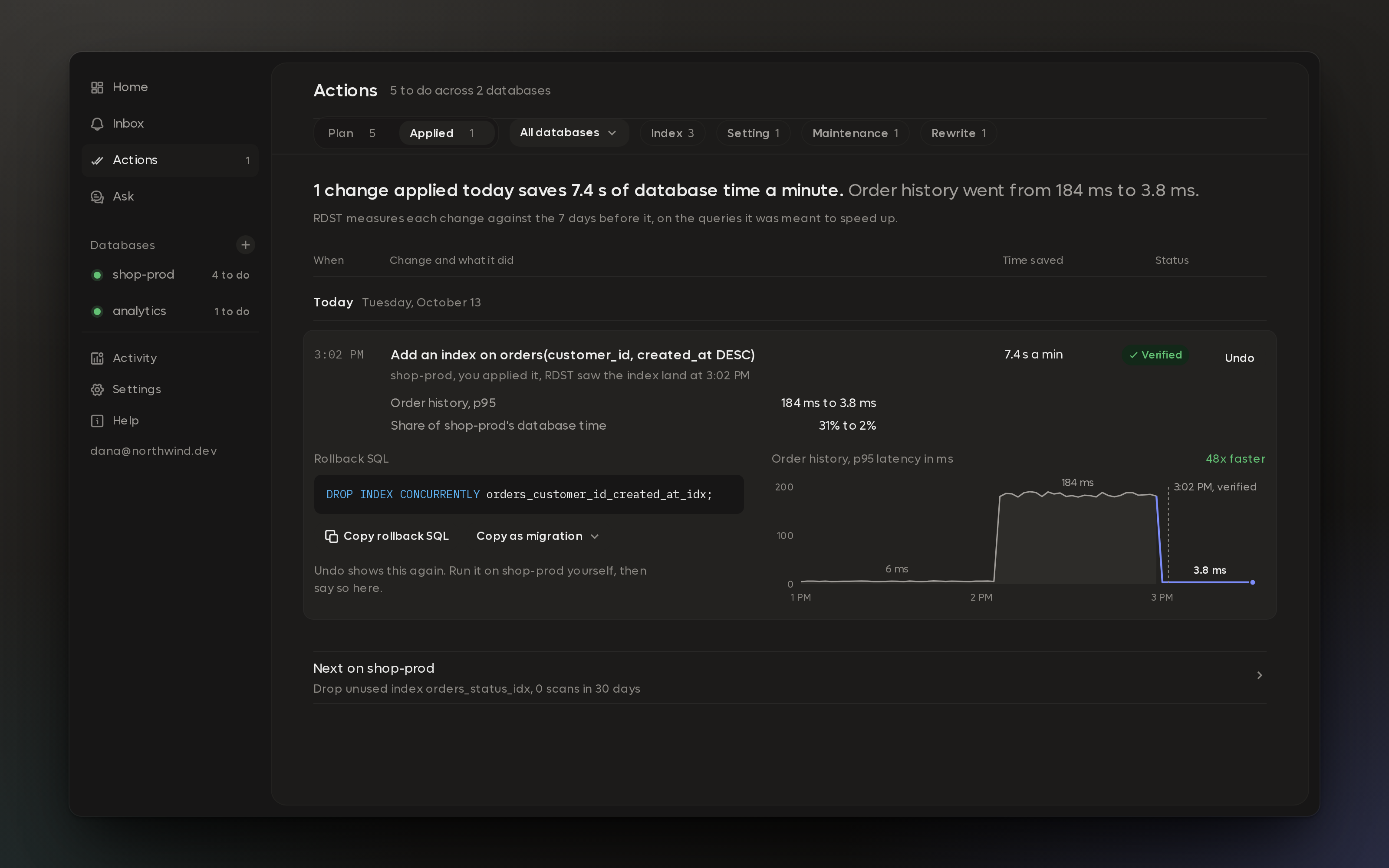
Verified: the agent measured the query before and after the index went in.
Why it runs on your desktop
We could have started with a hosted service. We started on the desktop because it's the shortest path to the databases people actually care about.
Your database credentials stay in your operating system's keychain. The connection runs from your machine straight to your database, so there's nothing to install on your servers, and Readyset never needs network access to your database. It reaches whatever your machine can reach, including a local Docker container, a database behind your VPN, or a private instance through an SSH jump host. Query history lives in a local SQLite database on your computer.
There's a tradeoff. The agent only collects while your computer is awake, and right now it's built for one person. For teams that want an agent running around the clock on their own infrastructure, we're working out a cloud version for enterprise teams. If that's you, tell us what you'd need at hello@readyset.io.
What gets sent to AI
Collecting stats, keeping history, running health checks and doing the arithmetic in reports all happen on your machine with no model involved. Two things go out.
Deep analyses and reports run on Claude Haiku from Anthropic. We don't send anything to foreign models. A request carries the query, its execution plan and the schema of the tables it touches, stripped of your data: no table contents, no result rows and no credentials. Anthropic doesn't train on API data. If you'd rather use your own Anthropic key, analysis goes straight from your machine to Anthropic.
Jev sees normalized query text along with table and index statistics, which is what it needs to decide what's worth your attention.
Every AI call the agent makes is listed on the Agent activity page, with what it did and when. The privacy docs cover the rest.
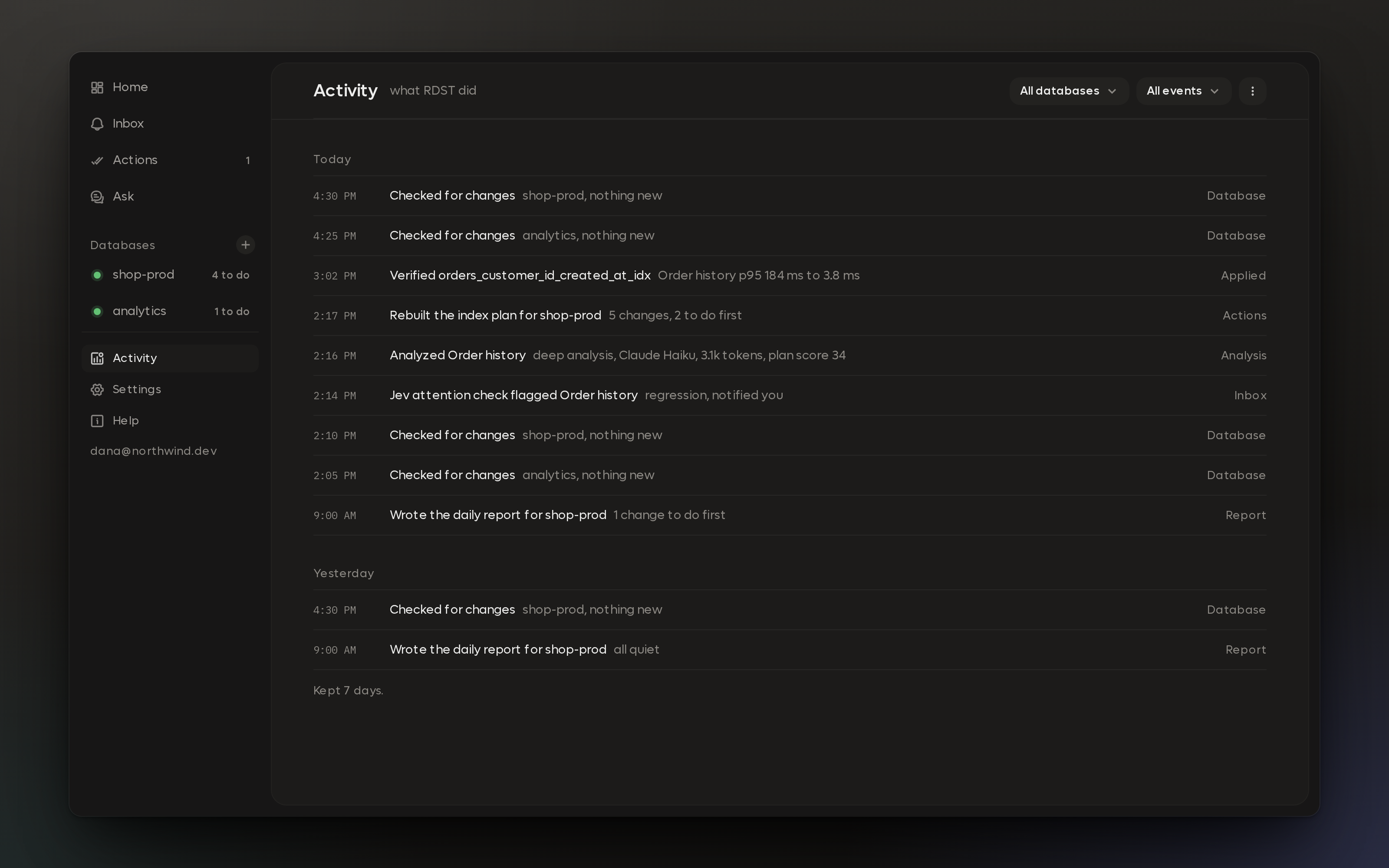
Agent activity: every check, analysis and verification from that Tuesday.
Try it
RDST is free and open source under Apache 2.0. It supports PostgreSQL 13+ and MySQL 8.0+ and runs on macOS (Apple Silicon), Windows and Linux. There's a demo database built in if you want to watch the agent work before you point it at your own.
Read the docs | RDST on GitHub
We'd love to hear what it finds on your database, and what it gets wrong. Come tell us in the Readyset Slack.
Related articles
Continue reading more about product updates.
Product Updates Readyset
September Product Update 2026
September was big for RDST: it's now Apache 2 licensed with free hosted inference, no API key required. We also hit 4.3M queries per second on a single node in our latest benchmark, 6.4x the prior release on the same hardware, plus password redaction, retry-safe error signaling, a batch of MySQL and Postgres cache-correctness fixes, and more.
2026-10-014 min read
Product UpdatesReadyset
What's New in RDST: Free Inference and an Apache 2.0 License
RDST is now released under the Apache 2.0 License with free, Readyset-hosted unlimited inference.
2026-09-292 min read
Product UpdatesReadyset
July Product Update
We launched the Readyset Platform this month, making database caching invisible: self-tuning freshness, eviction that can't be thrashed, and a desktop app that gets running in a few clicks. Plus a round of shallow-cache performance and observability improvements, and new writing on read replicas, TopK, and how AI is driving up your database costs.
2026-08-194 min read